How technology is changing how we work

Technology and workplace evolution

Once upon a time not too long ago anyone who had their own home office, or even merely a desk, was an author, professor or company director. With the advent of the internet, email and mobile technology, dynamic working is now attainable to the masses. Fusing working from home with going into the office.

Hybrid working

A study carried out by the Confederation of British Industry showed that teleworking rose from 14% in 2006 to 46% in 2008. This figure has continued to rise and according to data from the Trade Union Centre (TUC), approximately four million people in the UK now work from home permanently, with millions more occasionally working from home.

With the obvious advantages of telecommuting, namely avoiding commutes to work and increased productivity, more and more employers are opting to give their workforce the homeworking option.

British Telecom was one of the homeworking pioneers. As far back as 1986, British Telecom began a telework scheme. Today 15,000 of the company’s 92,000 employees work from home. At HSBC, 15,000 out of 35,000 members of staff also have the option of working remotely. The company argues homeworkers save on average, £6,000 a year, take fewer sick days and are 20% more productive.

The shift toward remote and hybrid working has also contributed to the rise of co-working spaces, where independent professionals, freelancers, and employees working remotely can benefit from a structured yet flexible office environment. This change is not just altering traditional work patterns—it’s redefining our understanding of workplace efficiency.

Technology’s role in the workplace

Just as technology has revolutionised remote work, it has also reshaped how we operate within an office environment. Technology is encroaching into most areas of our lives, including how we run meetings. Thankfully, these technological advances are improving the dynamics of how business meetings and conferences work, making them ever more efficient and effective.

Technology has streamlined workplace communication, ensuring that interactions are permanently recorded via email and collaboration platforms rather than relying on word-of-mouth exchanges. This shift has improved accessibility, efficiency, and the ability to communicate seamlessly across teams and time zones.

The benefits of technology for the workplace

How technology breaks down workplace barriers

Whether it is routing calls effectively, having access to internal systems or being able to monitor productivity amongst employees, it is all made possible with the use of cloud-based technologies.

Increased collaboration

Cloud computing enables companies to deploy communication tools, apps, and shared databases, making collaboration effortless. Businesses can now integrate new tools while phasing out outdated systems more seamlessly than ever before. What once took months to implement can now be introduced in weeks or even days, significantly boosting efficiency and agility.

Small businesses gaining a competitive edge

Whilst using cloud-based systems was once a privilege for larger organisations with bigger budgets, now smaller companies with smaller budgets have access to these technologies. This gives smaller businesses a competitive edge against larger competitors, by being able to access the same technology-assisted tools.

For example, video conferencing—once an expensive, enterprise-level tool—is now available to businesses of all sizes. This has made remote meetings, international collaboration, and virtual networking as accessible to startups as they are to multinational corporations.

What are your thoughts about the homeworking revolution? Are you, like HSBC and British Telecom, in favour of giving employees the flexibility of virtual offices? Or are you more on Yahoo’s wavelength, who’s CEO recently banned remote working as part of a new “era of collaboration?”  

Guest Blog: Appamondo – Starting up a business in the cloud.

 Starting up or running a business in the cloud at WorkWell provides you with options to collaborate, communicate and grow, which will help you to compete for business on a UK-wide basis.

As a technology service provider, Appamondo help choose the right applications to set your business up in the cloud. We take responsibility for deployment, training and education, and then providing ongoing support to you and your team. In this way, you can combine a bricks and mortar presence with remote tools that mean you are ‘always on’.

We always get asked why people should change to the cloud…

Here are five tips and reasons to work this way.

1. Avoid capital expenditure on computers, servers, software licenses and installation or maintenance costs.

Build a business with low-cost, subscription-based applications to reduce budget spend on software. Similarly, budget can be reduced by operating on a ‘bring your own device’ basis. Avoid buying devices and hardware you don’t need (servers, desktop PCs, etc)

2. Collaborate & communicate wherever you are.

Use business software that can be accessed remotely, such as Google Apps for Business™ for email, calendar, office package and storage. This will allow you to access your work from any location, making flexible working complication-free. Make use of online storage and collaboration tools to interact regularly and remotely with colleagues and customers.

Use video calling to increase frequency of face-to-face time, which in turn can help save money and time spent of commuting.

3. Automate administrative processes.

Automation means less time on admin, more time to grow the business!Use applications which integrate and streamline processes to bring efficiency to your workflow.

Mission-critical tasks like accounting can be automated using Xero, thus improving cash flow.

4. Go paperless.

Cut your costs and wastage by adopting sustainable practices like going paperless. Online storage tools allow creation, storage, sharing and collaboration in the cloud, removing the need for multiple copies and paper revisions.

Make sure applications match your business needs – there is a paperless solution for most processes.

5. Buy your technology as a service – lowest cost to operate

Technology can be purchased on a subscription basis without capital costs. Beware! Support from setup through to ongoing support is relatively non-existent (important if you are migrating data!)

Look for a technology provider who can meet all your business requirements – deployment (including migration of existing data), education in the form of training and ongoing support on a per-user (not company basis) should be mandatory for you!

Don’t just stop at these tips. If you want to ask more questions, contact the Appamondo team on 0843 224 9088 or social@appamondo.com. We are happy to help!

Michael Smith

Appamondo

WorkWell runs a professional office space that works around your business. We produce the highest quality space with complete monthly flexibility so that you can have a fluid workflow with minimal hassle. We are happy to work with Appomondo. They have a great service that will benefit a wide range of companies looking for easier management tools.


10 mistakes you should avoid as a start-up

 Launch day is drawing unnervingly closer. Will your product be a success? Or will it, like three out of four start-ups, be discarded onto the failure heap before it’s even got going?

The trick is not to put yourself in this position in the first place. The gold rule of any business venture is to have a pretty solid understanding that your product or services are going to be successful. In order to have such an understanding, you will need to carry out extensive market research prior to the launch date.

Of course, in reality, knowing your start-up is going to be a success is easier said than done. If this was the case, then why do the majority of entrepreneurs fail to meet their goal of becoming a millionaire by the time they are 30?

That said, there are certain fairly common mistakes start-ups make that can and should be avoided. And the best way to avoid going down dead-end avenues that are likely to prove detrimental to your business, is to avoid them.

With this is mind, take the time to look at the following 10 start-up mistakes you should avoid.

1- Failing to carry out adequate research

It has been said that 9 out of 10 start-ups fail because their original concept isn’t viable. They are so desperate to be in business that they fail to do enough homework prior to the launch of their product. Thus, the business is doomed from the outset.

2- Spend too much money

It is quite easy to get carried away in pumping 20 years’ of savings into your business venture – after all you have to ‘speculate to accumulate’. As cash flow is the bloodline of every business, it is important to protect the capital you have as you never know when you’ll need it.

As Andy Karuza of Brandbuddee advises:

“Anything unexpected can come up after you launch. You might not realise your product needs more work before people will buy it. Don’t spend all your money up front; you need enough to last through the first year or until you gain traction.”

3- Forgot to have a Plan B in place

It is not uncommon for young businesses to be so full of optimism that their venture is going to succeed that when things do go wrong, there is no backup plan in place. For example, if your manufactured product is failing to sell as well as you had hoped, do you close operations, spend more money improving the product or resort to a different plan? Without that plan in place, the future looks depressingly bleak.

4- Proceeding without emergency funds

If you don’t have a backup plan in place, the chances are you don’t have any emergency funds available either. The two go hand in hand as a plan B typically requires the money to fund it. Without the funds available, your start-up could sink before it’s out of the starting blocks.

5-Believe that your job is done

A director and business owner’s job is never completely done and it would be a mistake to think that the hard work was over when the product has gone ‘live’. In reality, the game has only just begun. As John Meyer of Lemonly says:

“After all your work designing, developing and testing, there’s a celebration when you click launch because you think you’ve made it. But that isn’t the finish line – it’s the starting line. Shift your mindset to know the hard work happens after the launch.”

6- Miscalculate market size

It is very easy to get excited about your own product, so much so that you inflate financial projections to investors. In reality, most products sell to a lot less than 1 per cent, so believing that your product is going to sell to millions before having any ‘proof’ can set you up for disappointment.

7- Embarking on a PR campaign before the product is ready

Adequate PR is essential for every start-up, but it is important you get the timing right. It might be tempting to launch a comprehensive social media campaign, attend every networking event in your field from London to Leeds to shout about your business venture, but if your start-up isn’t ready to be opened to the public, your efforts will be wasted.

8- Spending a lot of money on offices, staff and facilities

Companies that fail typically comprise, as Entrepreneur writes, “lower sales, higher costs and too much overhead.”

Refrain from signing a 12-month contract with a state-of-the-art office block on Canary Wharf and handing out employment contracts offering fantastic salaries before you have a proven turnover to justify such expenditures.

9- Failing to outsource certain business aspects

While it is tempting for over-optimistic start-ups to be lavish in their pre-product launch spending, it can be equally as tempting to take on everything themselves and not have the time to dedicate to elements of their business which will help it grow, like driving sales.

You don’t need to spend the earth and blow your budget outsourcing certain elements of your business to people who are professionals in that field. For example, having a chartered accountant take care of your tax issues will free up some of your valuable time without costing a fortune.

Take a look at our earlier blog on ‘40 things you should outsource’ in order to free up time to areas of the business that will nurture growth instead of festering for failure.

10- Lacking simplicity

It is fairly common for start-ups and entrepreneurs to have their ‘fingers in too many pies.’ Whilst it might be sensible not to put ‘too many eggs in one basket’, being involved in too many projects can result in neglecting your main venture, which can ultimately lead to failure.

Are you a start-up who has succeeded? Or perhaps your business venture failed for a specific reason? We’d love to hear your experiences and tips of how to be a successful start-up.

Questions to ask before you begin co-working : What exactly do I get?!

Hot desking FAQs: What exactly is included?

You’ve heard of it, your friends are enthusiastically raving about it, you fancy trying it but you’re unsure what exactly co-working  and hot-desking are. Put simply, it is a style of work which involves working in a shared environment. The shared office space is typically an office which comprises of independent activity and unlike a ‘conventional’ office, those working are not typically employed by the same organisation.

Okay, so you get the general gist of this modern working phenomenon, but you want to know what exactly is involved when you settle down to work.

Fortunately help is at hand. In order for you to comprehensively understanding what flexible office space entails take a look at our following guide to what exactly is included when you take the plunge into the increasingly popular world of co-working.

A desk

The most basic element of a hot-desking package includes the member getting his or her own desk. As Forbes writes: “People don’t want to work in tiny cubicles anymore.”

Instead of jostling for room in a coffee shop, co-workers get their own workstation that gives them ample room to spread out and make the most of their individual working space.

Office furniture

Of course, you can’t have a desk without a chair to sit on! Co-working centres do, of course, provide members with a chair. Unlike many ‘conventional’ offices, which are not well known for providing employees with the most comfortable of furniture, many of the higher-end co-working centres, such as WorkWell, stock only the highest quality of office furniture.

The Internet

The internet has single-handedly provided people with new ways of working. With the World Wide Web spurning remote working initiatives and improved access to business applications, it stands to reason that the internet is an imperative feature of co-working offices.

For the remote worker, having access to quick Wi-Fi can make their working day considerably more productive. Consequently, co-working centres make ultra-rapid Wi-Fi an inherent part of their co-working packages.

On-site IT support

When you are working independently, if you are not what you’d consider to be something of an IT whizz, a breakdown in telecommunication can be catastrophic. This is when co-working centres, which have IT support at the ready, can prove invaluable.

Aside from ultra-quick Wi-Fi, many of the higher-quality co-working centres, such as  WorkWell, include onsite IT support. If your equipment or data fails you, all is not necessarily lost.

As Liz Elam, founder of LinkCoworking, told Forbes:

“Entrepreneurs who are trying to work out of their home struggle with isolation. Co-working allows them to have a built-in support system – and that in itself is priceless.”

Refreshments

How many times have you gone downstairs to make a much-needed cup of tea when working from home, only to find there are no teabags left! As the Huffington Post writes, having a constant flow of information can make you understandably agitated. Workers are encouraged to take regular breaks away from their computers in order to reduce stress levels and improve productivity.

In fact, apps are now even available, such as Google Chrome’s Take A Break, in which a small icon flashes every 15 minutes as a reminder for you to stop surfing and go and have a drink.

Though we have to admit, going to make a drink only to find there is no tea or coffee available will not do our anxiety levels any favours.

In shared offices, this less than favourable scenario is unlikely to occur. As the likes of WorkWell co-working offices always have a well-stocked kitchen. At WorkWell you can even forget about cheap instant coffee as our co-workers have the luxury of being able to have as much freshly brewed coffee as they want in a day!

Temperature control

There have been numerous studies carried out to determine the impact the air temperature of an office has on employee productivity. It is widely agreed that an optimal office temperature should be between 21 and 23 degrees Celsius.

Regulating the temperature in a homeworking environment so that it’s warm in the winter and cool in the summer can cost an independent worker a significant sum each year. Most co-working centres include total temperature control, meaning you can enjoy working in the ideal temperature all year round.

And the extras…

Phones

For an additional cost that is not included in the co-working membership packages, co-workers can have their own phone line. Some co-working centres will provide a landline number for your business. This number can be forwarded to your mobile number of to a personalised voicemail.

Meeting rooms

As home offices and coffee shops rarely have enough space to swing a cat let alone invite clients, colleagues or potential clients over for a meeting, many remote working set-ups lack the ‘professionalism’ of an office.

This is where co-working offices can help give you and your business a professional edge. For an additional cost, co-workers can book to use a comfortable meeting room which includes all the latest presentation and conferencing facilities.

When you consider you’ll have access to ultra-rapid Wi-Fi, a built-in support system, top-quality office furniture, year-round temperature control, a potential landline number and a well-facilitated meeting room at your disposal, co-working in Leeds memberships can be a cost-effective way to give your business a boost in the right direction.

Want to try coworking in Leeds or Harrogate? Let us know! Get in touch with me and try us for a week.

Which Serviced Office layout best suits your business in Leeds?

 Long gone are the days when one serviced office looked almost identical to the next, with clusters of workstations nestled together defining one team from another and doing little to nurture cross-department collaboration.

Today flexibility is at the core of modern working ethics, and none more so than when it comes to office layout. Design experts generally believe a mix of spaces is preferable as diverse office layouts and design will “suit various individuals and teams who are working on different tasks.”

While a diversely laid out office might be ideal to, as Google says, “create many different places so people can be as productive as possible,” not all businesses have the resources and funds to create such an eclectic mix of office space.

Besides, there are certain types of office layouts that are more suitable and productivity-enhancing for specific types of business.

Take a look at the Carrwood Park guide on how different business types require different serviced office layouts. You can then use our guide to help you decide which office layout is best for your business.

So, what different types of office layouts are there?

The main types of office layouts are:

  • The Open-Plan office
  • A mixture of open and closed spaces
  • Cubicle Farms
  • The Row Layout Design
  • The Cellular (traditional) office

The Open-Plan Office

As we stated in our previous office layout blog, open-plan offices are gathering momentum, and are currently the preferred method of 70% of offices in the United States.

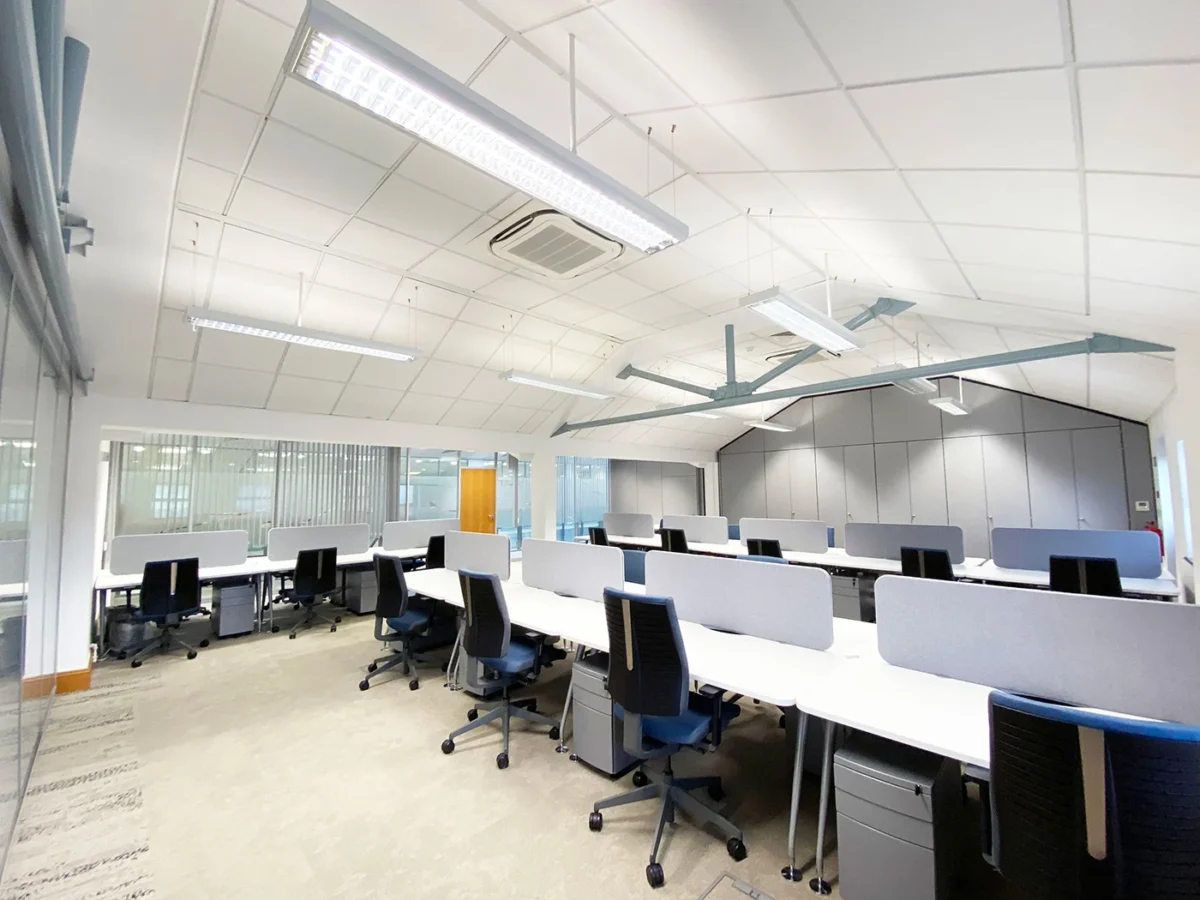
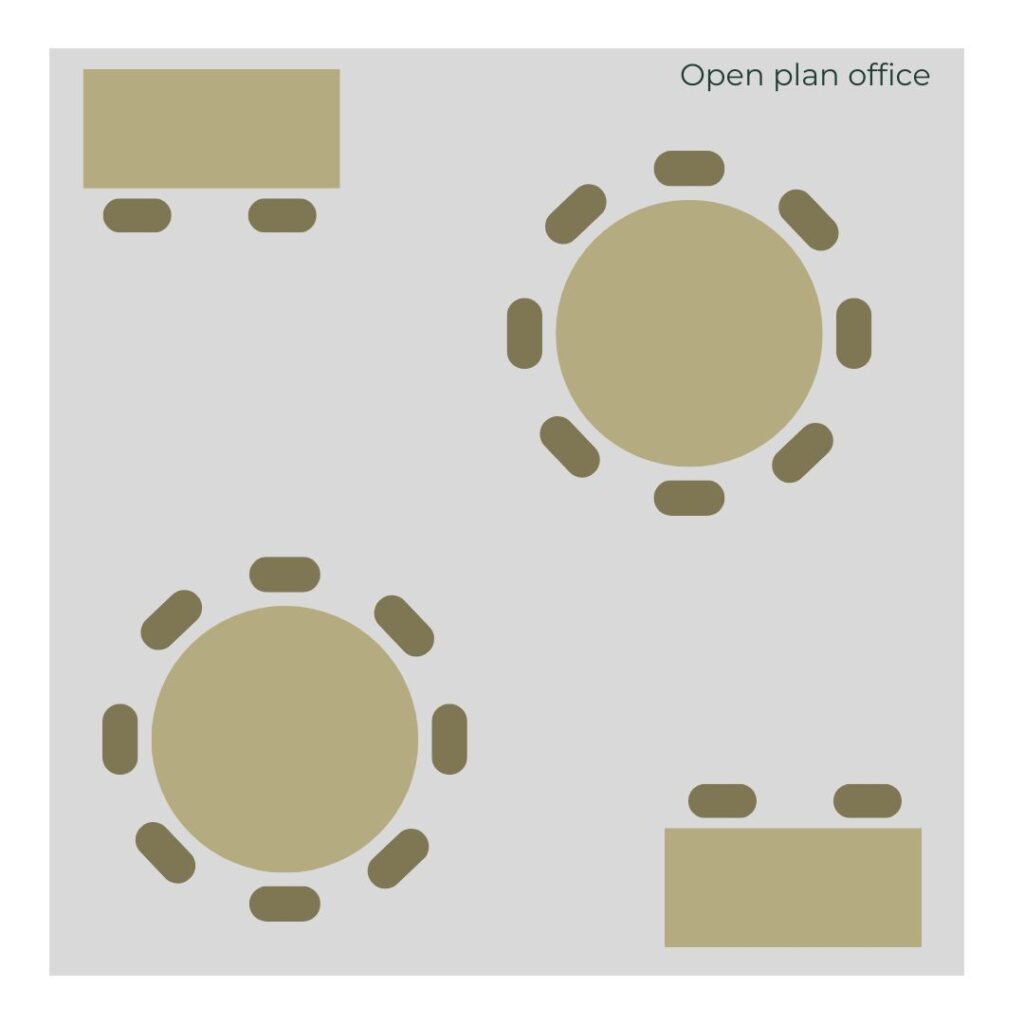
Open-plan offices involve everyone working in one big room that is void of dividers and everyone mixes and works under the same roof. Meeting rooms and conference rooms are often located on the outer walls in this type of office environment.

As the BBC writes, this “new type” of open-plan office “encouraged disclosure, discussion and debate” and can even help businesses reduce overheads.

“Managers were mixed in with the masses, cutting down on the expense of managerial offices and allowing organisations to manage their workforce more flexibly.”

So what type of businesses is an open-plan office design suitable for?

As this type of office design is a creative environment, open-plan offices are great for creative businesses, such as design companies or digital agencies, which often require the use of an open-plan layout to nurture communication among employees.

A mixture of open and closed spaces

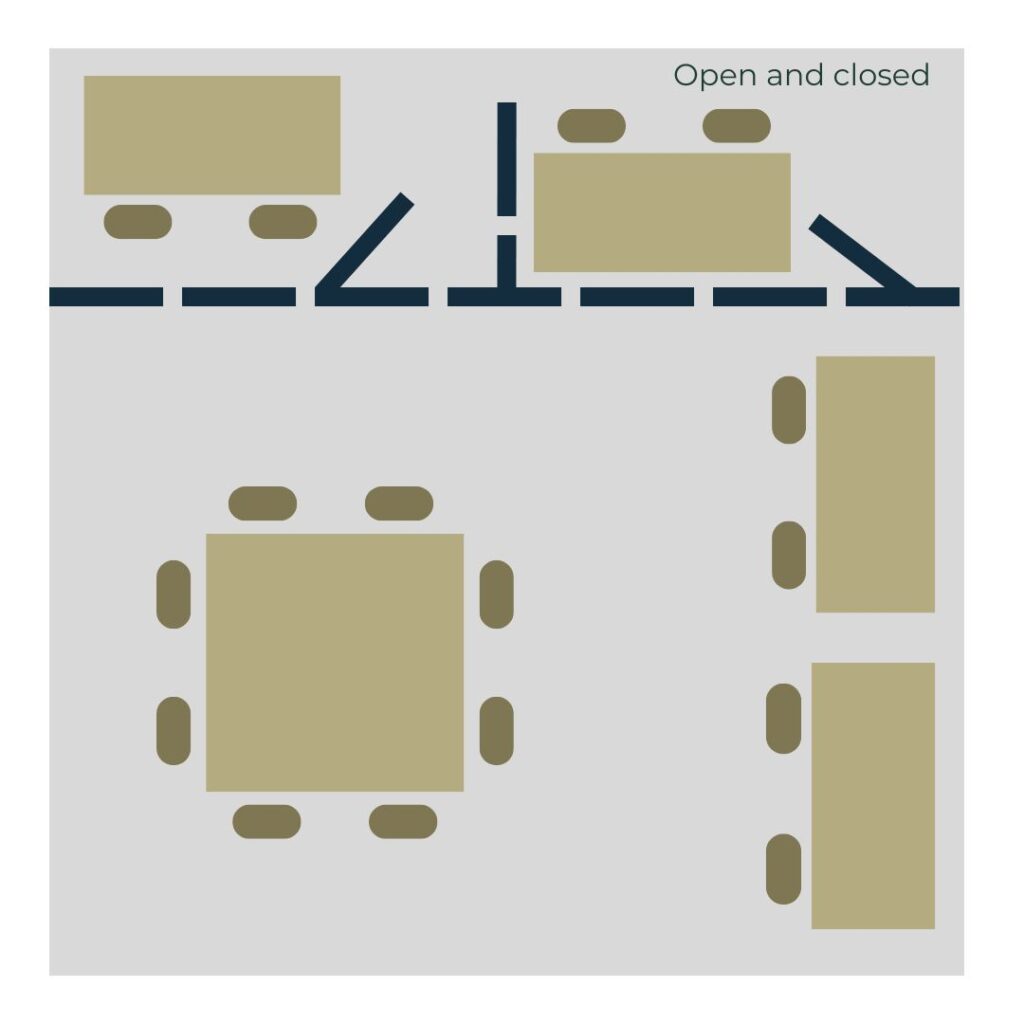
Citing the downsides of an open-plan office layout, namely being noisy and germ-rendering environments, Inc.com believes a better solution would be an office that provides and mixture of open and closed spaces.

This type of office has places where people can work alone but can be seen and accessible to colleagues and a place where different teams can potentially work together.

“By mixing open and closed spaces, offices can glean the benefits of open designs – a symbolic sense of mission, a laid-back feeling of innovative enterprise – without the noisy and potentially unhealthy drawbacks,” writes Inc.com.

Cubicle Farms

Cubicle farm-style offices are comprised of partitioned rows of spaces which are separated by dividers that only reach halfway up to the ceiling. The partitioned spaces are usually separated by aisles, designed for communication and negotiation amongst staff. It is important to remember that traffic flow needs to be considered in this type of office layout which is designed for a large number of workers. Aisles, particularly central aisles, need to be wide enough to accommodate traffic flow and employees passing one another.

These cubicles are typically equipped with a computer and phone line. Sometimes there is just one worker per cubicle, but often two or three employees share a cubicle.

Cubicle Farms are most suitable for firms with high volumes of middle management, such as call centres, in which managers can mix and be of assistance to staff with ease.

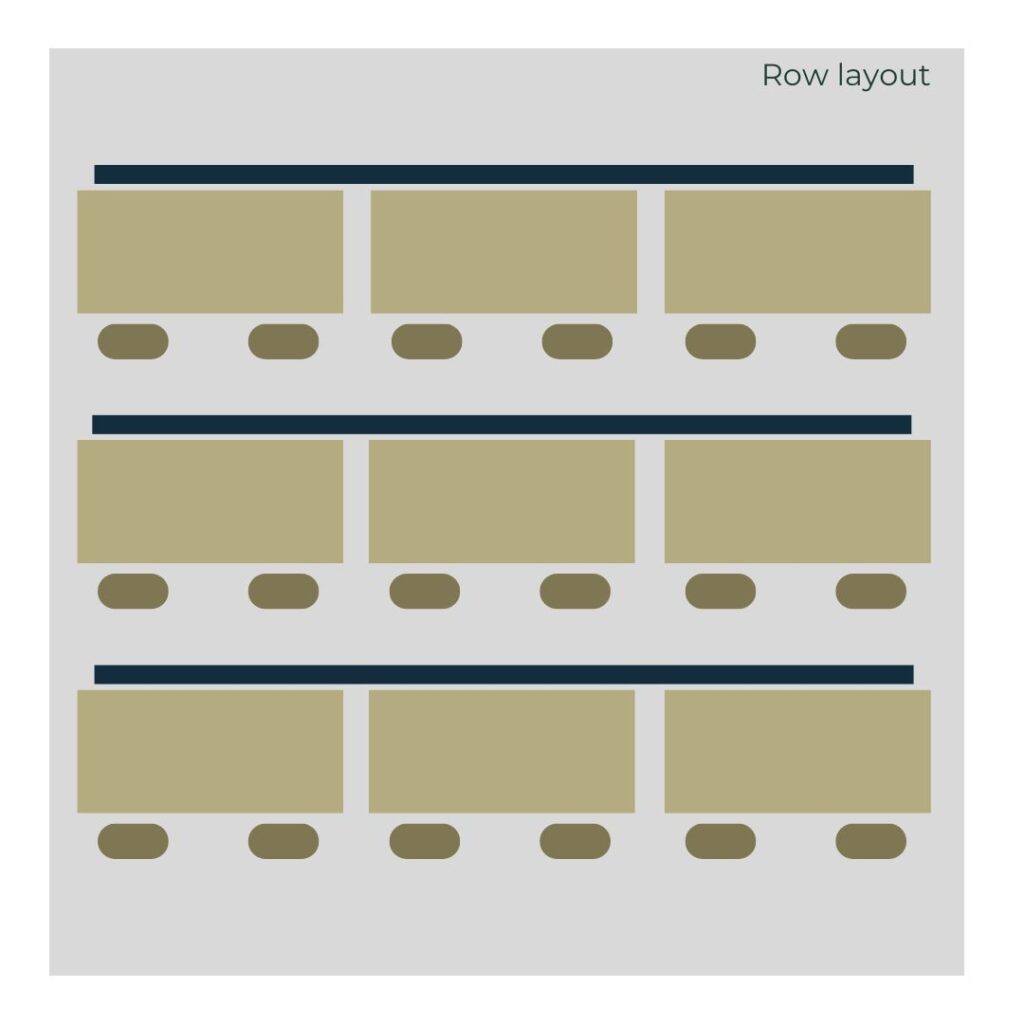
The Row Layout Design

By the same token, a row layout office is also effective for call centres and businesses where employees spend their day on computers and phones. The Row Layout design is a traditional type of office space which comprises cubicles lined up in rows.

As the Small Business Chronicle points out, the row layout can be appealing to many businesses due to the ease of assembly and the fact it doesn’t require extensive planning. As with the cubicle farm layout, the rows are often segregated by high dividers to give workers privacy.

The Cellular (traditional) office

In its paper about different office layouts, the James Hilton Academy describes the Cellular layout as being offices that are made up of smaller individual rooms in which a small number of employees work.

In this type of office, individuals or small teams can be isolated by closing a door.

What type of business would benefit from a cellular layout?

Any business which requires staff to work routinely in a private setting is likely to be most suited to a cellular setup. For example, a law firm which requires individual rooms for lawyer and client confidentiality would require a cellular layout.

Businesses that rely on teamwork between colleagues and creative, spontaneous collaboration such as creative agencies would not be suited to this traditional type of office layout.

The choice of your office design should not be taken lightly. Get it right and an office can be a vital tool in sparking creativity and nurturing productivity. Get it wrong and your employees and ultimately your clients are likely to suffer.

Enjoy this blog? Why not read our other post ‘Setting up your office for maximum productivity’

For flexible, stylish and professional serviced offices in Leeds and Harrogate, get in touch with WorkWell.  

What do you need in a Virtual Office?

It’s no secret, the number of people working at home and from remote locations is rapidly escalating.

As the Office for National Statistics (ONS) prove, in the first three months of 2013, approximately 13.9% of the UK workforce worked from home offices, the highest number since records began in 1998.

As our blog about how technology is changing the way we work specifies, technology such as Cloud has made homeworking a reality. Despite the unprecedented growth of home working, an office within a home-based setting has limitations.

A Virtual Office is designed to combat the limitations of a home office. Whilst the advantages of a virtual office are fairly blatant and undisputed – namely giving a business a professional address and subsequently a more specialised image – it is safe to say there are several features of virtual offices that remain significantly less recognised and celebrated.

If you are deliberating joining the thousands of SMEs and professionals in their pursuit to take their company and working ventures to new elevated levels by getting a virtual office, take a look at some features of this increasingly popular working practice, you may not realise you need.

So, what do you need in a Virtual Office?

Unlimited post

A company’s post piling up at home isn’t particularly conducive to professionalism. Nor is failing to be in to collect an important parcel or letter. A Virtual Office immediately eradicates such potential problems.

Virtual Offices, such as WorkWell’s Virtual Office, include unlimited post as part of the package. Ensuring all letters and parcels are picked up and collected in a professional manner will not only mean a crucial company letter isn’t chewed up by the family dog never to be seen again, but will also be collected in a professional manner, heightening the credibility of your company.

Unlimited phone calls

How many times do you get interrupted, your trail of though lost, by the phone ringing? You might not realise it but when you have your own Virtual Office you will have the privilege of having a professional receptionist answer your calls.

Delegating the essential, if not mundane, task of having someone else pick up your phone calls will mean you can enjoy an uninterrupted day’s work and concentrate on elements that will ultimately make your business grow.

The same ‘professional enhancing’ principle of having a receptionist professional deal with your post can be applied to the unlimited phone calls that users of Virtual Offices can take advantage of. With a receptionist answering your calls and either forwarding them to you or to your answering machine will not only mean you can get on with more pressing components of running a business but it will also mean you never miss a call.

Use of a desk

Whilst Virtual Offices are predominantly centred on giving businesses the professionalism of having a glamorous address, as well as phone call and mail forwarding services, it can be equally as beneficial to many SMEs and freelancers to have a desk they can use.

For example, Carrwood Park’s co-working spaces enable workers to reap the benefits of having a professional office desk, namely access to fast Wi-Fi, IT support, and the buzz, banter and networking opportunities life in an office offers.

Such vital modern working elements are essential in driving a business forward and nurturing success.

Use of a meeting room

So business is picking up and whilst it was once sufficient to conduct client meetings in a local Starbuck’s, with your company rapidly progressing, you require a more professional, well-facilitated and easy-to-access meeting room.

Once upon a time you might not have realised you would be needing a meeting room but as your business grows so does the need to hire a professional, well-facilitated meeting room.

Take advantage of Carrwood Park’s meeting rooms, which being just 15 minutes from Leeds City Centre and two minutes from the M1, means your guests can show up and enjoy a professional meeting in the most stylish of environments.

Location, location, location

Estate agents love to say it but the popular phrase ‘location, location, location’ is being adopted by virtual offices.

The location of an office, virtual or not, is important for several reasons. With a desirable and professional-sounding business address, clients, potential clients, outsourced and others are likely to view your business venture with greater credibility.

What’s more, using an office that is located in a stylish building, on the outskirts of a large city or town with convenient access and free parking, will not only be more convenient for you to use but will be easier for clients to visit.

If you have any further questions or would like to arrange a viewing or book a Virtual Office at WorkWell, please don’t hesitate to get in touch.